How is an Egress Server provisioned?
A user clicks Create on the Egress Servers page of the Web
Console, picks a region and options, and the orchestrator runs a
saga that takes about five minutes end-to-end. The name is
generated automatically. The user sees the row's status move from
Pending / In Progress to Complete once the server is ready.
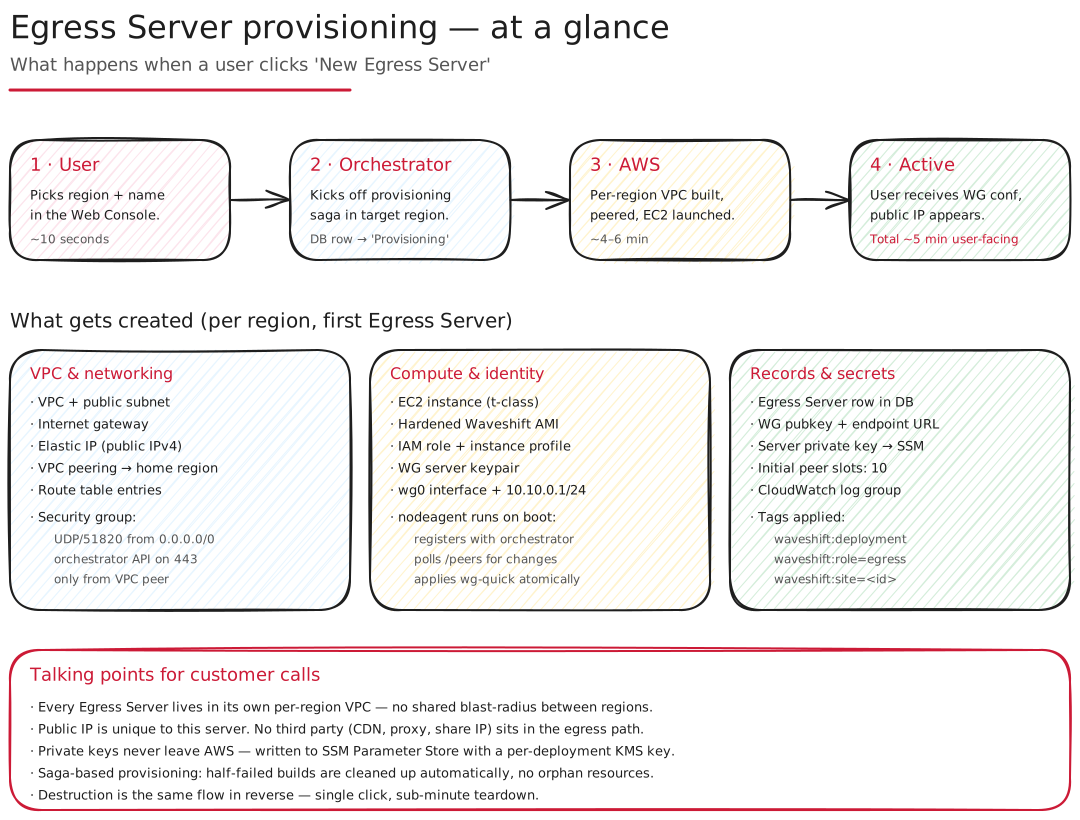
The stages
- User — picks region, number of WireGuard peers, and the optional Node, Kasm, and Cloudflare toggles in the Web Console.
- Orchestrator — creates a DB row marked
Pendingand kicks off the provisioning saga in the target region. - AWS — Egress Server and UDP ingress-proxy EC2 instances launched into the region's VPC, WireGuard configured. ~4–6 minutes.
- Complete — user receives the WireGuard configs (file or QR code) and the public IP appears in the table.
Behind those four user-visible steps is the per-region VPC
(created when an admin enabled the region, with its public
subnet, internet gateway, and peering to the home region),
security groups, an Egress Server EC2 running Amazon Linux 2023
(arm64), a small UDP ingress-proxy EC2 in front of it, a WireGuard
server keypair, the wg0 interface, and BuildID tagging for
inventory.
The saga is compensating — if a step fails, the steps already completed are rolled back automatically. Destruction is the same flow in reverse and completes in under a minute.
See also
- How many IPs does an Egress Server use? — the IPs the saga allocates.
- Console → Egress Servers — the user-facing flow.
- CLI → Walkthrough — the
partner-side equivalent via
wsctl.