Integrations administration
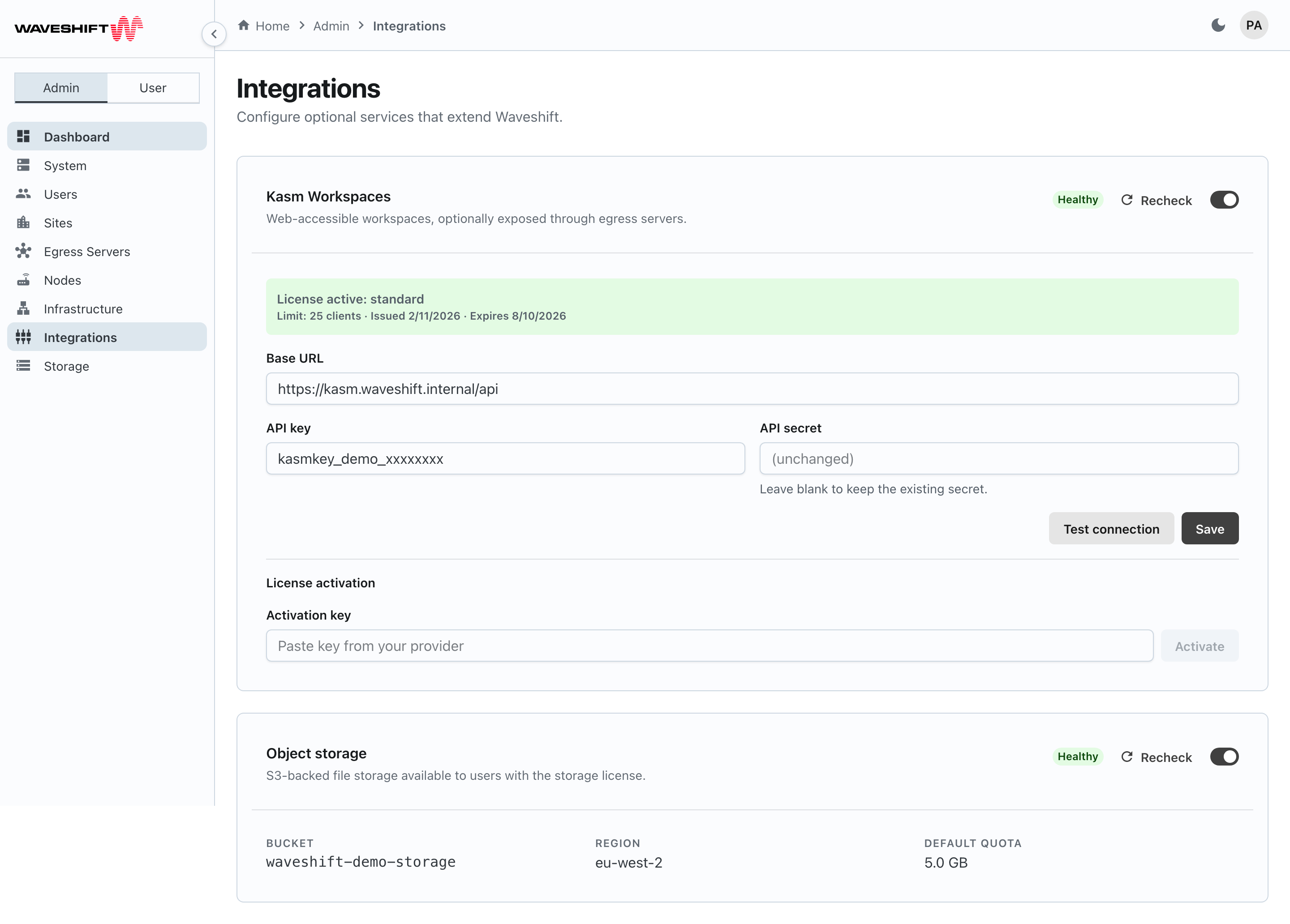
The Integrations page (/admin/integrations) configures the two
optional services Waveshift can plug into: Kasm Workspaces for
remote browser sessions, and Object Storage for the per-user
Files feature. Each is its own card with its own enable toggle and
health status.
Kasm Workspaces
The Kasm card carries three controls in its header:
- Health badge —
Healthy,Disabled, or, when unhealthy, the orchestrator's last error message (falling back toUnhealthy) in a red chip. - Recheck — refresh-icon button; runs a fresh health probe against the configured Kasm host.
- Enable / Disable toggle — disabled (greyed out) if the
platform licence doesn't include the
kasmfeature.
If the platform licence doesn't include Kasm, an inline warning explains that a license is required to use Kasm Workspaces and the configuration form is hidden.
The configuration form is shown only when Kasm is licensed and enabled with the toggle:
- Base URL — the Kasm deployment's public URL.
- API key — the Kasm API key.
- API secret — write-only password input. The placeholder reads
(unchanged); leaving it blank keeps the existing secret. Type a new value to replace it. - Test connection — verifies the credentials against Kasm without saving. Disabled until both Base URL and API key are filled.
- Save — persists the configuration and re-runs the health probe.
Below the form, a smaller License activation section (always shown) handles licence activation inside the Kasm host itself: paste the Activation key issued for your Kasm deployment, click Activate, and Waveshift forwards it to the Kasm API. A successful activation populates a green admonition above the form summarising the licence type, client limit, issue date, and expiry.
Object Storage
The Object storage card mirrors the Kasm one, but storage credentials are configured via environment variables on the orchestrator host (S3 bucket, region, access key, secret), not via the UI. Hence the card is mostly read-only:
- Health badge + Recheck + Enable / Disable toggle in
the header, as on the Kasm card. The toggle is disabled if the platform licence
doesn't include the
storagefeature or if the credentials aren't configured on the host. - A warning admonition appears in either of those cases explaining what's missing.
- Bucket — the configured S3 bucket name.
- Region — the bucket's region.
- Default quota — the default per-user storage quota (e.g.
10 GB;Unlimitedif0). Edit this on the Storage page, not here.
Re-checking after fixing host configuration flips the badge from
Unhealthy to Healthy without needing a deploy.